
Last updated on
Oct 31, 2026

Papa Johns Application free printable template
pdfFiller is not affiliated with any government organization

Fill out
Complete the form online in a simple drag-and-drop editor.

eSign
Add your legally binding signature or send the form for signing.

Share
Share the form via a link, letting anyone fill it out from any device.

Export
Download, print, email, or move the form to your cloud storage.
Why pdfFiller is the best tool for your documents and forms


End-to-end document management
From editing and signing to collaboration and tracking, pdfFiller has everything you need to get your documents done quickly and efficiently.
Accessible from anywhere
pdfFiller is fully cloud-based. This means you can edit, sign, and share documents from anywhere using your computer, smartphone, or tablet.
Secure and compliant
pdfFiller lets you securely manage documents following global laws like ESIGN, CCPA, and GDPR. It's also HIPAA and SOC 2 compliant.
What is Papa Johns Application
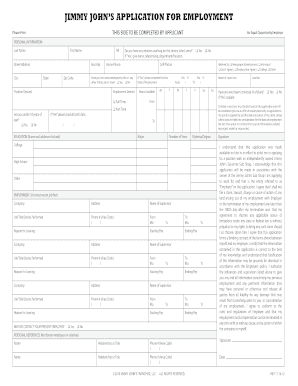
The Papa John's Employment Application is a job application form used by individuals seeking employment at Papa John's restaurants.
pdfFiller scores top ratings on review platforms




Just getting started, but so far so good!
I am not tech savy but I was able to do what I needed.
Who needs Papa Johns Application?
Explore how professionals across industries use pdfFiller.

Papa Johns Application is needed by:
-
Job seekers applying for positions at Papa John's
-
Individuals interested in delivery driver roles
-
Applicants for management and in-store positions
-
People requiring an employment application template
-
Students or part-time job seekers searching for flexible work
-
Unemployed individuals looking for new job opportunities
Comprehensive Guide to Papa Johns Application
What is the Papa John’s Employment Application?
The Papa John’s Employment Application is a critical document for individuals seeking employment with the brand. This application form is designed for various positions, including management roles, delivery drivers, and in-store staff. To complete the application, candidates must provide essential details such as personal information, work history, and references. The information collected is vital for assessing an applicant's suitability for the job.
Purpose and Benefits of the Papa John’s Employment Application
Completing the Papa John’s Employment Application is a significant step for job seekers interested in joining the company. Utilizing platforms like pdfFiller facilitates this process, offering a user-friendly experience and secure storage for completed applications. This application streamlines the hiring process, making it easier for applicants to present their qualifications effectively.
How to Fill Out the Papa John’s Employment Application Online (Step-by-Step)
Filling out the Papa John’s Employment Application online can be straightforward. Follow these steps to complete the application:
-
Open the application form on the pdfFiller platform.
-
Enter your personal information, including name, address, and contact details.
-
Provide your work experience details, listing past employers and job titles.
-
Answer delivery-related questions, if applicable, such as vehicle information.
-
Review your entries for accuracy before submission.
Careful attention to these sections ensures that all required information is complete.
Key Features of the Papa John’s Employment Application
The Papa John’s Employment Application includes several important components that enhance usability. Key features consist of:
-
Fillable fields for easy data entry.
-
Checkboxes to simplify selections, especially for prior experience.
-
Sections dedicated to delivery driver information, including driving history.
-
A certification statement requiring applicants to verify the truthfulness of their information.
-
Authorization for background checks, ensuring compliance with safety standards.
Review and Validation Checklist for Your Completed Application
Before submitting the application, it's essential to review the content thoroughly. Use this checklist to ensure completeness:
-
Have you included all required personal and work history information?
-
Did you answer all the application questions accurately?
-
Have you signed the application correctly?
-
Are there any common errors in your previous applications that you need to avoid?
How to Sign the Papa John’s Employment Application Securely
Signing the Papa John’s Employment Application is crucial for validity. You can choose between digital signatures and traditional wet signatures. A digital signature can streamline the submission process but ensure it complies with legal standards. When sending the signed application, confirm that it is transmitted securely to protect your personal information.
Where and How to Submit the Papa John’s Employment Application
The submission of the Papa John’s Employment Application can be achieved through various methods:
-
Online submission via pdfFiller.
-
In-person delivery to your nearby Papa John’s location.
-
Check for any specific state submission rules applicable to your location.
-
Note deadlines and expected processing times to stay informed.
Security and Compliance of Your Papa John’s Employment Application
Ensuring the security of your application is paramount when using pdfFiller. The platform employs robust security measures, including 256-bit encryption, and complies with data protection regulations like HIPAA and GDPR. Understanding how your data is protected during and after the application process highlights the importance of privacy in job applications.
What Happens After You Submit the Papa John’s Employment Application?
After submitting your application, you can expect feedback within a standard timeframe. Generally, applicants who want to check their application status can do so by contacting the hiring manager or online through the application portal. If rejected, understanding common reasons can help you improve future applications and enhance your job-seeking strategy.
Utilizing pdfFiller for Your Employment Application Needs
Leveraging pdfFiller's capabilities can significantly enhance the application process. With features that allow users to fill out, sign, and manage job applications conveniently, pdfFiller's cloud-based access provides a simple and efficient solution. Embrace the benefits of using pdfFiller to ensure a seamless experience throughout your application journey.
How to fill out the Papa Johns Application
-
1.Access the Papa John's Employment Application on pdfFiller by visiting their website and searching for the form in their templates section.
-
2.Open the form in the pdfFiller editor where you will find interactive fields ready for you to fill in your personal information.
-
3.Before starting, gather necessary information such as your full name, contact details, work history, and references. Make sure to have details about your driving history and insurance if applying for a delivery driver position.
-
4.Begin completing the form by filling in your name, address, and contact number in the designated fields. Ensure accuracy as this information is essential for your application.
-
5.Proceed to provide details about your previous work experience in the appropriate sections. Include job titles, company names, and the length of time you worked at each position.
-
6.If applying for driver positions, don’t forget to answer questions related to your driving history and upload any necessary documentation regarding your insurance.
-
7.Review all filled fields to double-check for any errors or incomplete sections. This is crucial as it reflects your attention to detail.
-
8.Finalize the application by adding your signature in the specified field on the form. This certifies the accuracy of the information provided.
-
9.Save your completed application by clicking on the save icon. You can also download the application in various formats or directly submit it through pdfFiller.

What are the eligibility requirements for applying at Papa John's?
To apply for a position at Papa John's, you must be at least 16 years old. Some roles, particularly management and driving positions, may require prior experience or a higher age limit.
Is there a deadline for submitting the Papa John's Employment Application?
Typically, there is no specific deadline for submitting applications to Papa John's; they continuously accept applications. However, timely submission is encouraged to enhance hiring opportunities.
How can I submit my completed application?
After completing your application on pdfFiller, you can download it and submit it in person at your local Papa John's, or utilize the online submission options if available.
What supporting documents do I need to provide alongside the application?
While the application may not require additional documents initially, having references and documentation of your driving history and insurance may be essential if applying for driver positions.
What are common mistakes to avoid when completing the application?
Common mistakes include providing inaccurate contact information, leaving fields blank, and failing to review the application for errors before submission. Ensuring clarity and correctness can improve your chances.
How long does it take to process my application?
Processing times may vary, but you can generally expect feedback within a week or two. Factors influencing timing include the number of applications received and the urgency of hiring for specific positions.
Can I fill out the application online?
Yes, you can fill out the Papa John's Employment Application online using pdfFiller, which provides a user-friendly interface for completing and submitting the form digitally.
Related Content
Related Forms



Related Catalogs
Get the latest insights from our blog


If you believe that this page should be taken down, please follow our DMCA take down process
here
.
This form may include fields for payment information. Data entered in these fields is not covered by PCI DSS compliance.